Rotating Video Panel

Posted: February 10, 2011 in Silverlight
Tags: , , ,

Silverlight Sample: Rotating Video Panel

Edit 2011-07-07: A wet floor effect has been added to the app. This includes a two-color background and an upside down reflection of the rotating video. You can check it out at the App Shop .

As an exercise in media handling and animation, I built a rotating video panel. This is not an original work, it is based on the rotating video panel by Sean Christman (CraftyMind), you can find it here (opens a new window or tab). Note that while rotating, texts are mirrored when we look at the rear site of the panel.
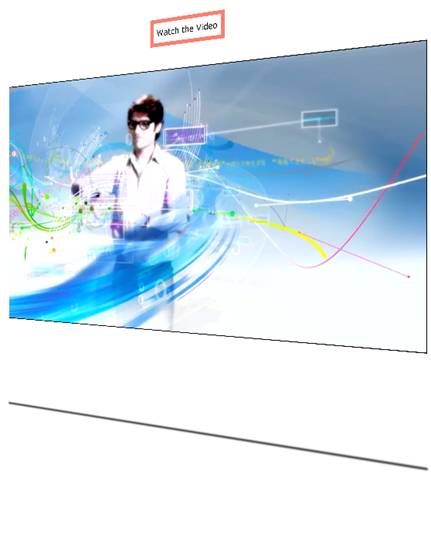
To me, it is of some relevance that when migrating someone else’s work to Silverlight, the stone is thrown a bit further. In this particular example the extra distance is small: the rotating panel scales with the size of the window if you change it.

Another nice feature, but that is typically Silverlight, is that you can install this panel on your pc as a small application, and run it offline also. Just right click the rotating panel, choose install from the menu, and follow the instructions. To uninstall it again, run the installed application, click it with your right mouse button, and choose uninstall.

An aspect that presents a nicety for me is that the Silverlight code is much shorter than the 145 lines of Html5 code that were required for the original work. The xaml below is all it takes to realize the rotating video panel, anything above “<Grid.Resources>” is generated code.

<UserControl x:Class="SpinningVideoPanel.MainPage"
    xmlns="http://schemas.microsoft.com/winfx/2006/xaml/presentation"
    xmlns:x="http://schemas.microsoft.com/winfx/2006/xaml"
    xmlns:d="http://schemas.microsoft.com/expression/blend/2008"
    xmlns:mc="http://schemas.openxmlformats.org/markup-compatibility/2006"
    mc:Ignorable="d"
    d:DesignHeight="600" d:DesignWidth="600">

    <Grid x:Name="LayoutRoot" Background="White" Margin="150,0,150,150" MinWidth="100" MinHeight="100">
        <Grid.Resources>
            <Storyboard x:Name="rotationStoryBoard1" RepeatBehavior="Forever"
                        Storyboard.TargetName="rotation1" Storyboard.TargetProperty="RotationY">
                <DoubleAnimation From="0" To="360" Duration="0:0:10"/>
            </Storyboard>
        </Grid.Resources>
        <Grid.CacheMode>
            <BitmapCache RenderAtScale="4" />
        </Grid.CacheMode>
        <Grid.RowDefinitions>
            <RowDefinition Height="50*" />
            <RowDefinition Height="175*" />
            <RowDefinition Height="75*" />
        </Grid.RowDefinitions>
        <Grid.Projection>
            <PlaneProjection RotationY="360" x:Name="rotation1" />
        </Grid.Projection>
        <Border BorderThickness="5" BorderBrush="Salmon" HorizontalAlignment="Center" VerticalAlignment="Center" >
            <TextBlock Name="textBlock1" Text="Watch the Video" VerticalAlignment="Center" HorizontalAlignment="Center" Margin="5" />
        </Border>
        <Border BorderThickness="1" BorderBrush="Black" Grid.Row="1">
            <MediaElement x:Name="mediaElement1" Source="Silverlight_540p20s.mp4" AutoPlay="True" Grid.Row="1"  Stretch="Fill" MediaEnded="mediaElement1_MediaEnded"/>
        </Border>
        <Rectangle Grid.Row="2" Name="rectangle2" Stroke="Black" StrokeThickness="1" VerticalAlignment="Bottom" Height="1" Margin="0,0,0,20">
            <Rectangle.Effect>
                <BlurEffect Radius="3"/>
            </Rectangle.Effect>
        </Rectangle>
    </Grid>
</UserControl>

The C# code below starts and repeats the video.

using System.Windows;
using System.Windows.Controls;

namespace SpinningVideoPanel
{
    public partial class MainPage : UserControl
    {
        public MainPage()
        {
            InitializeComponent();

            Loaded += new RoutedEventHandler(MainPage_Loaded);
        }

        void MainPage_Loaded(object sender, RoutedEventArgs e)
        {
            this.rotationStoryBoard1.Begin();
        }

        private void mediaElement1_MediaEnded(object sender, RoutedEventArgs e)
        {
            mediaElement1.Stop();
            mediaElement1.Play();
        }
    }
}

Configuration settings promote GPU utilization, in case a suitable graphics card is present in the client computer.

You can see the rotating video panel in action in my App Shop here.
Choose between Plug-Ins and HTML5? No, go for Apps!

Stats show that consumers like plug-ins, but site owners fear they don’t. Developers are caught in the middle. Must we choose the HTML5 technology stack with is meager installed base, or build on plug-ins and restrict our client base? No! Developers can turn to making Apps that hold or require plug-ins. A web site becomes an App feed, a home page becomes an App store.

Introduction

What will people visit your web site with? If you have some interest that they do, you want to know, because you will have to find your optimal position somewhere between a mouth watering user experience and accessibility for all. An ultimate user experience requires “the latest technologies”, accessibility for all requires, alas, the eldest.

Statistics concerning the web are easy to obtain, but vary wildly among sources en change quickly. Let’s first see what web browsers look like (today, according to various sources).

Statistics on web browsers

Market share: diversity – incompatibility

Which web browser has the largest market share (on PC)? Without distinguishing between the various versions, we see that at early February 2011 (source: www.Computeridee.nl <- www.Tomsguide.com <- www.netmarketshare.com )

Web Browser Market Share (%)
Internet Explorer 56
Firefox 23
Chrome 11
Safari 6
? ?

I myself have IE 9 (beta), Chrome 9 and Safari 5 installed on my PC (Firefox seems a bit behind technologically at this moment. Many more people will be in comparable situation, so what do these figures mean? Most windows PCs (87% according to www.statowl.com) will have at least IE.

Anyway, the trend is down for Internet Explorer, and up for the others. Opera has gone into the category “?”. The four dominant web browsers use three rendering engines, all with different capabilities. Great!

Unifying technologies – plug ins

By providing plug-ins, technology is added to a web browser. Web sites that build on a plug-in can depend on practically all the features built into the plug-in, across the dominant web browsers. But how about the market penetration of the web browser plug-ins? If I build my site on a plug-in, will anybody be able to see / hear it? There are three major plug-ins: Flash, Java and Silverlight. This is what we know about their use (source: www.statowl.com , figures over December 2010):

Web Browser plug-in Market Share (%)
Flash 96
Java 79
Silverlight 60
QuickTime 59

So, all PCs have Flash. Note that market share for web browser plug-ins is like that of web browsers not mutually exclusive. You will have at least two, but probably all of them installed.

The trend is (slightly) down for Java, stable for Flash, and up for the rest.

Unifying technologies – The Html5 technology stack

Slowly but surely, Html5 makes its way to the web browser. The whole technology stack mentioned here consists of Html5, CSS3, JavaScript 1.8.5, and perhaps SVG 1.1. These technologies each have strong capabilities in 3D graphics and media support.

A drawback compared to plug-ins is that these technologies lag behind: they do not provide webcam or microphone support. Ok, Html5 has the ‘device’ tag, but it is not implemented in any (main) web browser. According to the Wikipedia, there are no plans to do so either. You can do so much more with plug-ins.

A problem, I think, with these technologies is that they are / have open standards, directed by boards containing parties that also have other, prevailing, interests. Progress in these boards and standards is slow, and so is their implementation. Nevertheless: support for (many of the features of) these technologies can be relied upon in the near future.

Where do we find support for above technologies? In the latest browser versions (IE9 beta, Chrome 9, Safari 5) you find:

Technology IE9 (beta) Chrome Safari Source
Html 5 96 pts 242 pts 202 pts The HTML5 test (max 300 pts)
CSS 3.0 Slight Partial Partial Wikipedia
JavaScript 1.8.5 Y Y Y Tutsplus
SVG 1.1 Limited (IE8 no support) partial Partial Wikipedia

You can find The Html5 test Here. You can find TutsPlus Here.

Statistics on web sites

Web browsers pull data from web sites; there will have to be some kind of compatibility.

According to www.statowl.com 88% of the internet users has a broadband connection to the web. So, what do, or can, they haul in?

– Only 30-40% of the web pages contain Flash elements.
– Only 3,2% of the web pages contain AJAX elements.

source: http://www.flashmagazine.com/news/detail/how_many_sites_use_flash/ (3,5 million pages tested in 2009).

Opera also did extensive research : http://dev.opera.com/articles/view/mama-key-findings/ (2009) and found that:

– There are about 1 trillion (10^12) web pages.
– CSS (any version) is used in 80% of the pages.
– Scripting (mainly JavaScript) is used in 75% of the pages.

Conclusions

1. The market for web browsers is divided, PC owners are likely to have several.
2. Consumers don’t mind installing some plug-ins to have the ultimate user experience.
3. Site owners don’t trust plug-ins, they rely on HTML, CSS and JavaScript.
4. The new and improved HTML, CSS and JavaScript versions find their way into web browsers only slowly.

So web page consumers and web site owners are on different tracks with regards to the ultimate user experience technology. Web browser builders all go their own way.

Now suppose that you want to create great web sites for many people. What to do?

– Use plug- ins, and only few site owners want to buy your sites.
– Use the Html Stack, and the state of the art in web browsers limits your possibilities.

Caught in the middle? Yes. Really? No!

We now have a new phenomenon: the App. People download software that is specific to some task or domain. Apps run on your device, usually out of browser, and are often connected applications. This provides a way around the web browser, or if you must, to install an App as part of your browser (that’s a plug-in, isn’t it?). Well, if you are downloading and installing an application, you don’t mind installing some supporting software that can also be used by other Apps, right?

So, this provides a way around the whole problem, and new possibilities to make your living on the internet therewith.

Make your website a place that feeds your Apps, Make your home page your App store! That is Web 2.0 also.

Not The Smallest Silverlight App

This blog post is not about the Smallest Silverlight App, it is about a Smaller Silverlight App. Mike Taulty (Microsoft) wrote a blog post “World’s Smallest Silverlight App 😉”.

I find this type of articles very informative since they point out essentials. The essential Silverlight application that Mike Taulty comes up with consists of a xaml file and an html file, the html file providing the context in which the Silverlight web browser plug-in renders the xaml.

The xaml:

<Canvas  
  xmlns="http://schemas.microsoft.com/winfx/2006/xaml/presentation">  
  <TextBlock Text="Hello, I'm Silverlight" FontSize="36"/>  
</Canvas>

The html:

<object data="data:application/x-silverlight-2," type="application/x-silverlight-2"  
  width="100%" height="100%">  
  <param name="source" value="ClientBin/splash.xaml" />  
</object>

But this is not the smallest application possible. For one thing, the xaml presented here uses the Canvas element as its root element. However, in Silverlight 4 you can use any rendered object (any object that derives from the UIElement class). So we set the TextBlock element as the root element, giving:

<TextBlock xmlns="http://schemas.microsoft.com/winfx/2006/xaml/presentation"
  Text="Hello, I'm Silverlight" FontSize="36"/>

In my software development environment, this is a single line of code. We should not expect to be able to reduce this much further.

The html, however, is open to further reduction. First of all, let’s remove the comma at the end of the data attribute. What is it doing there? Then note that we have both a data attribute and a param sub-element that refers to the data to be loaded. It turns out; we can safely remove the data attribute, but need the “source” parameter.

<object type="application/x-silverlight-2" width="100%" height="100%">  
  <param name="source" value="ClientBin/splash.xaml" />  
</object>

This is the final proper result, for me. I’m certain there has to be an easy way to inline the xaml in the html. The standard way is to embed the xaml in script, which would increase the size of the code again. I don’t know how to do that, so this is it for me. The above result is Not The Smallest Silverlight App.

However, a not so proper further reduction of the html can be made by using an iframe, like this:

<iframe src="ClientBin/splash.xaml" width="100%" height="100%">

Very short, but it does introduce in the browser an extra, and non-functional, navigation bar at the top of the iframe. At the time of writing this, I haven’t succeeded yet in making it disappear. So, finally, in short and not so proper: The minimum Silverlight application consists of two lines of code. One line of xaml, and one line of html.

Reading O’Reilly and Battelle: “Web Squared” (2009) – with comments

As a web site designer-developer I want to be up-to-date on the development of the World Wide Web. People are using the buzz word “Web 2.0” – as something that will evolve into Web 3.0 soon. Well, as it turns out, it is already here. The article discussed here is available at http://www.web2summit.com/web2009/public/schedule/detail/10194.

The article

This blog post build on a previous post on Web 2.0. The authors update the earlier article: the creation of value by users is called “crowdsourcing” nowadays. The structure of successful sites stimulates and directs the creation of value for the users, and for the owners. The structure is such that more people will create more value (bring your friends!). The authors call this “harnessing the activities of the users”.

Opportunities identified are not only to disagree with the consensus, but also to be able to identify interesting types of metadata. For instance, the metadata that Facebook generates is that of a social graph (?).

The data to be owned comes increasingly from sensors, mainly sensors in Smartphones. Examples are the: camera, microphone, GPS receiver, motion sensor, proximity sensor. Also in industry, logistics and retail (barcode at the cash register of the supermarket) a lot of data collecting is going on.

Ownership is not interesting only of sources of base data but (increasingly) of metadata. “Metadata” covers concepts as enriched data, and structure within and between (huge) data sets, among others. The structure in the data is brought about by human activities (e.g. tagging), but also by machine learning.

Services are increasingly about managing, interpreting and responding to large amounts of data, in real time. The real time component seems to be introduced by means for instant messaging.

Integration is still a major theme. Applications integrate multiple sources of information. Cooperation and not control is a major growth and development factor. (2011 update: Google drops HTML5 support for the H.264 video codec in its browser; Intellectual rights and access restrictions are considered harmful for the development of the web).

An interesting relation is the one between things (people) in the world and the data about them on the web (Information shadow on the web). Things tend to get increasingly uniquely identified on the web by the increasing amount of data on the web about it (MD: emergent identity).

The authors argue that Web 2.0 is not a version number. So, there will not be something like a Web 3.0. Rather, “Web 2.0” was their term to describe the restart after the burst of the Internet hype. Now they call it Web squared, since developments seem to increase in speed and magnitude swiftly.

Comments

This article, like its predecessor is a Must Read, especially for Internet entrepreneurs.

One may find (e.g. here) texts about semantic relations on the web, and that this phenomenon introduces Web 3.0. These semantic relations – primarily brought about by tagging, thus generating emergent semantics – seem an inherent development of existing activities on the Web.

In linguistics (at the time I read about it regularly) it was ok to distinguish between syntactical, semantic and pragmatic aspects. Pragmatism being about the effect a syntactical construct can bring about, what it can do (to you), or how you can use it to get something done. So I was wondering what would be the pragmatics of the Web. Would that then be Web 3.0, or 2WEB?

After pondering for a while on this question I concluded that “Apps” embody the pragmatism of the data available on the web. This has interesting implications: people who by Apps subject themselves to the pragmatics of the App makers. Software developers are the free citizens, since they can subject data to their pragmatics. We also see an explosive increase in the number of available Apps on the market, which will call for ways to search among them, and structure the results. Now we have move the next level up. Fascinating!

Reading O’Reilly: “What is Web 2.0” (2005)

As a web site designer-developer I want to be up-to-date on the development of the World Wide Web. People are using the buzz word “Web 2.0” – as something that would be around soon. Well, as it turns out, it is already here.

“Web 2.0” is a concept predominantly developed and brought to exploitation by Mr. Tim O’Reilly (O’Reilly Publishing Company) and by Mr. John Battelle. The 2005 article: “What is Web 2.0” by O’Reilly is available on the Web at http://oreilly.com/web2/archive/what-is-web-20.html. I think it’s a Must Read.

The article is about “Design Patterns and Business models for the Next generation of software”. It is of particular interest for web entrepreneurs and web site creators. Why? The article analyses why and how the winners of the first generation Web companies survived and prospered. And it does so very well, to my taste. In fact the article provides a set of best practices for Web entrepreneurs and design patterns for the web sites to use. New Web entrepreneurs cannot ignore these practices, models or patterns. Doing so implies loosing the competition against companies that do take them into account, or even improve on them.

Brief summary of conclusions

Web 2.0 applies not only to the Web server-client model, but also to P2P applications. The web is not about delivering software (in releases), but about delivering services involving data.

The market doesn’t exist of a view large companies, but rather of the enormous number of small companies and individuals – Those should be reached.

People do not just consume your service, but they also create value when engaged in activities on your site. Activities motivated by some self-interest (could be just having some fun). The owner is the facilitator of these activities; the web site is the platform. The value created benefits all – both users and owners. You don’t advertise your site, Advertisement is by hearsay. Content on the web is not static, it is changing. Users of your site can subscribe to changes (made by other users). This dynamics create communities. In general, a reinforcing feedback loop should be the driver for growth of your business. On the other hand: static links between sites and user tagging of contents creates structure in the vast amounts of web data.

Successful Web companies own some kind of data. This can be basic data, or a form of data enrichment. Opportunities can be found by disagreeing with consensus; privacy doesn’t seem to be all that important to the users anymore, and the enforcement of intellectual rights ownership seems to be less strict – in certain areas, notably not in the areas of movies or music.

Software, the web site, is updated in extremely short cycles, no doubt using agile software development practices. Motive is that the delivered service should closely follow customer desires. I detect an empirical improvement cycle here, a la Lean production systems or product development. Software is characterized by being lightweight and having simple features. The service delivered by your software is likely to be reused by others. The motto here is not to control, but to cooperate. Software should target various devices, and provide Rich User Experiences.

Rounding up

My current understanding is that Web 2.0 revolves around an explosive self-induced growth of the use of your website. All you do should serve this single goal. The revenues and “raison d’être” of your web company is a side effect of this large scale use. Your site should look and feel fabulous, and should be instantly adapted in order to optimize the usability for its visitors.

It is not easy to admit, but a few years I made a bad buy – not a bargain; bought a NAS
(Network Accessible Storage) for over a thousand Euros, of an at the time well
respected brand (no, not anymore), and the device never operated properly. It
had a hibernation mechanism, which came in handy considering the noise level,
but frequently crashed the device during wake up, after which the system
executed an extensive disk check. The NAS had 2 Terabytes of disk space and the
disk check took over 12 hours, during which the system was not accessible. Also
storing large files or reading back file – large or small – frequently made the
system crash.

Many, many hours did I spend searching the internet for a solution. Without actual success. At some point I did find a review of the model on Amazon, from a buyer with
comparable experiences. And that was it for me. The NAS was going to be
demolished and destroyed! Well, the useful parts (4  Hitachi hard disks of 500Gb each) were to be reused, of course.

And so I did. The old NAS’ hard disks in their rack, and the fan of the power supply have
been reused, the other parts garbaged. An old Fujitsu Siemens Scaleo 600 is the
basis of the new NAS. In order to avoid needing an extra hard disk to carry the
operating system, I bought a  2nd hand Promise SX6000 SuperTrak RAID Controller (€ 45,- delivered at home). The OS is Windows XP Professional SP3. Management of the new NAS is via an Ethernet cable, other data transport is via WLan. The graphics card has been removed after construction and test (reduces power consumption, and in particular heat
dissipation). Management is via a Remote Desktop.

Below you’ll find some annotated pictures of it all.

Remainders of the old NAS

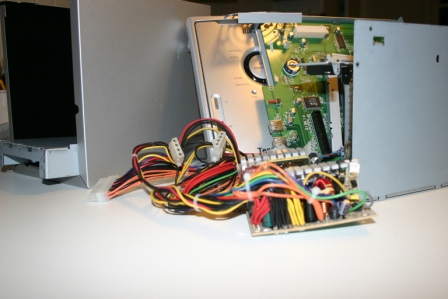
Picture 1. Remainders of the old NAS. The spaghetti on the foreground comes from the old power supply.

The New NAS

Picture 2. The new NAS based on a Fujitsu Siemens Scaleo  600. The DVD devices and floppy drive are not operational. They’re just there  to draw up a clean façade.

Rear view of the new NAS

Picture 3. Rear view. The 4 leds are the RAID  Controller’s. If the NAS is on, they do an nice imitation of Night Rider’s KIT.  The little white panel with cylindrical knob is the fan (noise, heat)  controller. The antenna is for Wi-Fi. The NAS has three fans and is
surprisingly quiet.

Interior of the new NAS

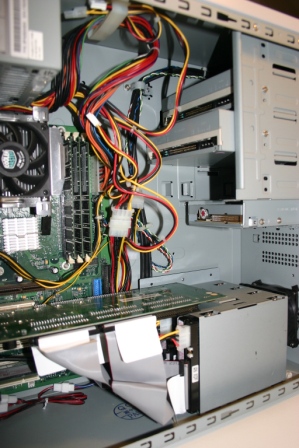
Picture 4. Interior. At the upper left is the power  supply. Below that the CPU fan (and CPU and cooler). The prominent horizontal  green slate is the RAID Controller. The gray block at the lower right is the  rack holding four hard disks, thoroughly screwed to the bottom of the case. Behind  the hard disk rack the extra fan, from the old NAS is just visible. DVD devices  and floppy drive are clearly not connected.

Firmware update of the Raid controller

A problem  to be solved when building the NAS was to furnish the RAID controller with the  latest firmware. Usually that is being done using a floppy drive, but that was
not possible in this case; see picture 4, the light blue floppy connector is
blocked by the RAID controller. The solution was to create and use a bootable
USB memory stick. But how do you make you USB stick bootable (DOS)? There are
many articles on the internet about this subject.  Most are useless. For me, this article from Microsoft (in Dutch) worked. The formatting  utility the article refers to has been replaced by HPUSBFW.exe that can be  found on the HP support site (try this link).

After  updating the firmware, the BIOS’ of the pc and the RAID controller were
compatible enough to have the RAID controller build a fast and safe RAID 1+0
configuration on the hard disks.

Installing Windows XP from  USB stick, including slipstreamed RAID controller driver

The next  problem was how to install Windows XP on the RAID configuration. Since we
cannot use a DVD device, a USB memory stick I the next alternative. However,
according to Microsoft, it is not possible to install Windows from USB memory /
drive. An additional challenge is that also the Promise RAID Controller driver
needs to be installed during the Windows install.

The  solution was found in the very adequate article (in English) by Roderick van
Domburg: “Installing Windows XP from USB”. The article presents clear steps. You need the BartPE environment and the RAM disk found in Windows Server 2003’s SP1. In order to ‘slipstream’ the RAID Controler driver into the installation package, one uses
the nLite tool.

BartPE is a  pre-configured Windows environment that you use to execute an nLite augmented  Windows XP install, following the directions by Roderick
van Domburg. A walk in the park, really.

Performance  of the new NAS

See the  graph below. The system reaches a transfer rate of almost 70Mb/s. Compared to
my new workstation (yes, also homemade 🙂 ), doing almost 300 Mb/s, that is
not much. But 70 Mb/s is also not that slow, so I settled for it.

Performance of the new NAS

Graph 1.  Transfer  speeds of the RAID Controller (RAID 10 on 4 hard disks).

Notice  however the flatness of the curve. Graphs of systems without extensive caching
(the Promise controller has a 128Mb cache) show a graceful (but continuous)
decay of performance as the heads need to make larger movements.

Bloopers

So, doesn’t  one ever get into trouble, when working with all these sensitive hardware
components? Oh, certainly you get into trouble.

CPU pins

If you  inspect picture 4, you may notice the completely clean interior of an over 10
year old pc. This is the result of an extensive cleaning operation. While
cleaning, I removed the CPU fan and cooler. It then turned out that the CPU was
stuck on the cooler (by the heat gel). At first I didn’t notice, and
consequently bent a whole lot of CPU pins when reinstalling the ‘cooler’ (No
sorry, no pictures available). For hours, sweating abundantly from distress,
I’ve been prying very carefully straight paths through the pins’ bases using a
magnifier (and reading glasses) and a potatoe peeling knife. At one moment the
CPU fitted its tray again, and as it turned out, everything still worked. Pfew!

Statics

Proudly I  showed my newly acquired Promise RAID Controller PCI card to my 11 year old daughter,  who seems to develop an interest in technology. She reached out and pointed at
some extending parts. A train of sparks jumped from her hand over to the Raid
Controller card. Actually, I thought it was lost, but surprisingly, it still
worked as well as before. Pfew!